
Helmline
A native iPhone client for self-hosted AI agents. Independently designed, built, and released on the App Store. Requires your own compatible Hermes Gateway.
- Independent Product Design
- Human Factors & UX
- SwiftUI Engineering
- App Store Release
- Period
- 2026
- Status
- Public App Store release · Version 1.0
Case study at a glance
- Problem
- People running self-hosted agents need to inspect work and review sensitive actions away from their computer.
- Design decision
- Separate execution summaries from detail, make approval scope explicit, and preserve each host’s identity.
- Result and scope
- A native iPhone app released on the App Store. Requires the user’s compatible Gateway; release is not evidence of market adoption.
Jump to a section
The problem: work continues when you leave the desk
I built Helmline for people who already run self-hosted AI agents on a Mac or VPS. Away from the computer, they still need to know what is running, inspect a result, or approve an action. A smaller chat window alone does not make that work understandable or safe to control.
I owned the product scope, interaction design, native iOS implementation, integration with compatible Hermes Gateways, device validation, and App Store delivery. The project started from my own workflow, not a formal user-research study.
App Store gallery: six product views
Browse all six App Store images using the arrows, swipe, or navigation dots. They show actual app interfaces with fictional demonstration content: sessions, execution, approvals, capture, multiple Gateways, and native status. Conversations and interview notes are fixtures, not user research or private sessions.
Three decisions that shaped the mobile experience
- 01
Show progress before the full trace
A compact execution summary keeps tool activity from overwhelming the conversation. Detailed steps remain available when the user needs to inspect how a result was produced.
- 02
Separate awareness from authorization
Widget and Live Activity surfaces make active work visible without reopening the app. Sensitive approvals require Face ID or the device passcode instead of turning a status glance into authorization.
- 03
Keep each host’s context separate
Mac and VPS connections remain distinct. Gateway identity follows sessions and navigation so switching hosts does not mix the work the user is inspecting or controlling.
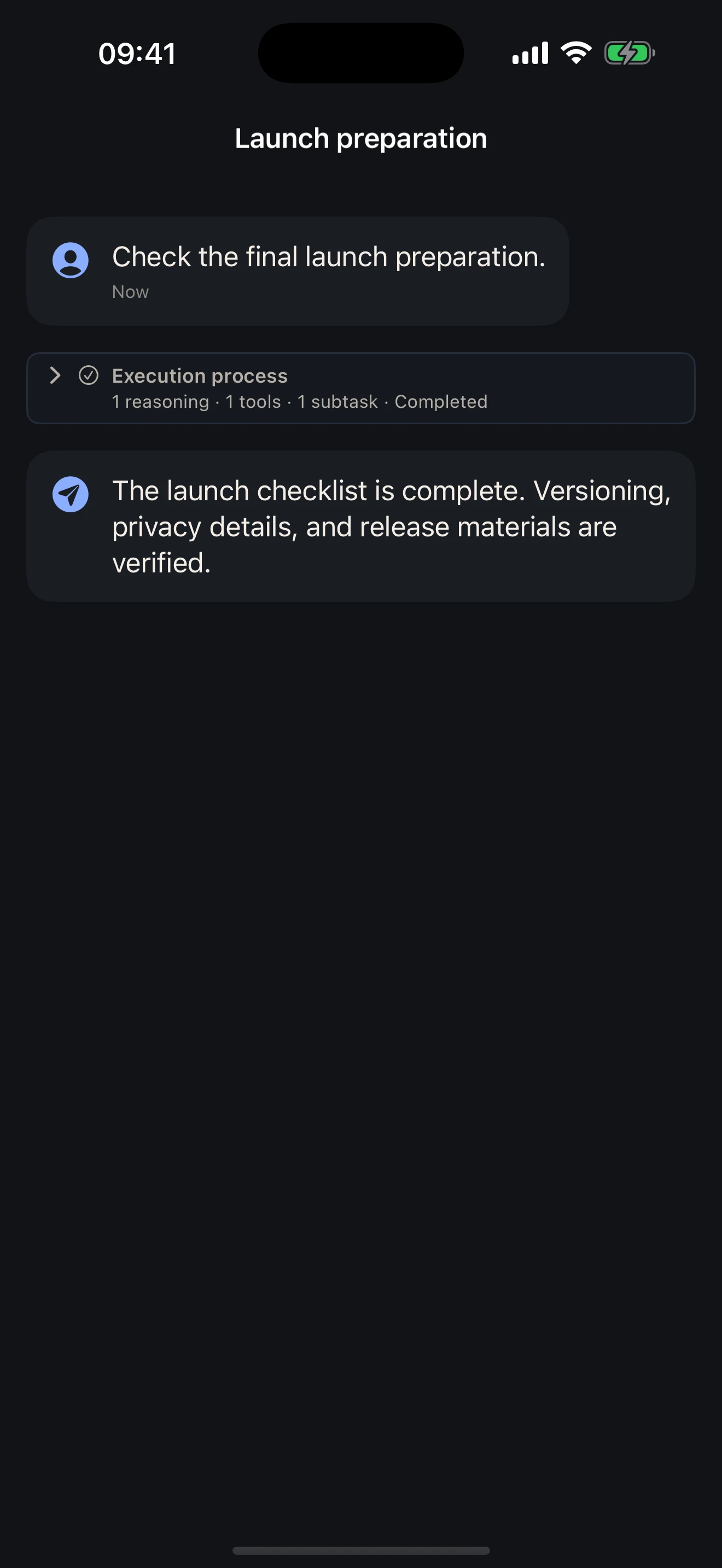
Execution UX: make the result easy to find
An agent conversation contains two different kinds of information: the answer the user needs and the activity that produced it. Giving every tool event equal space makes a short check-in turn into a transcript-reading task.
I separated execution activity from the final response. A compact summary communicates progress; an expandable detail view exposes reasoning, tools, and subagent steps when inspection is needed. Historical execution follows the same summary-to-detail pattern rather than introducing another reading model.
The tradeoff is deliberate: some detail takes an extra action to reach, but it no longer competes with the answer by default. The shipped chat timeline and execution views implement that distinction. This is an interaction decision, not a measured claim of faster task completion.
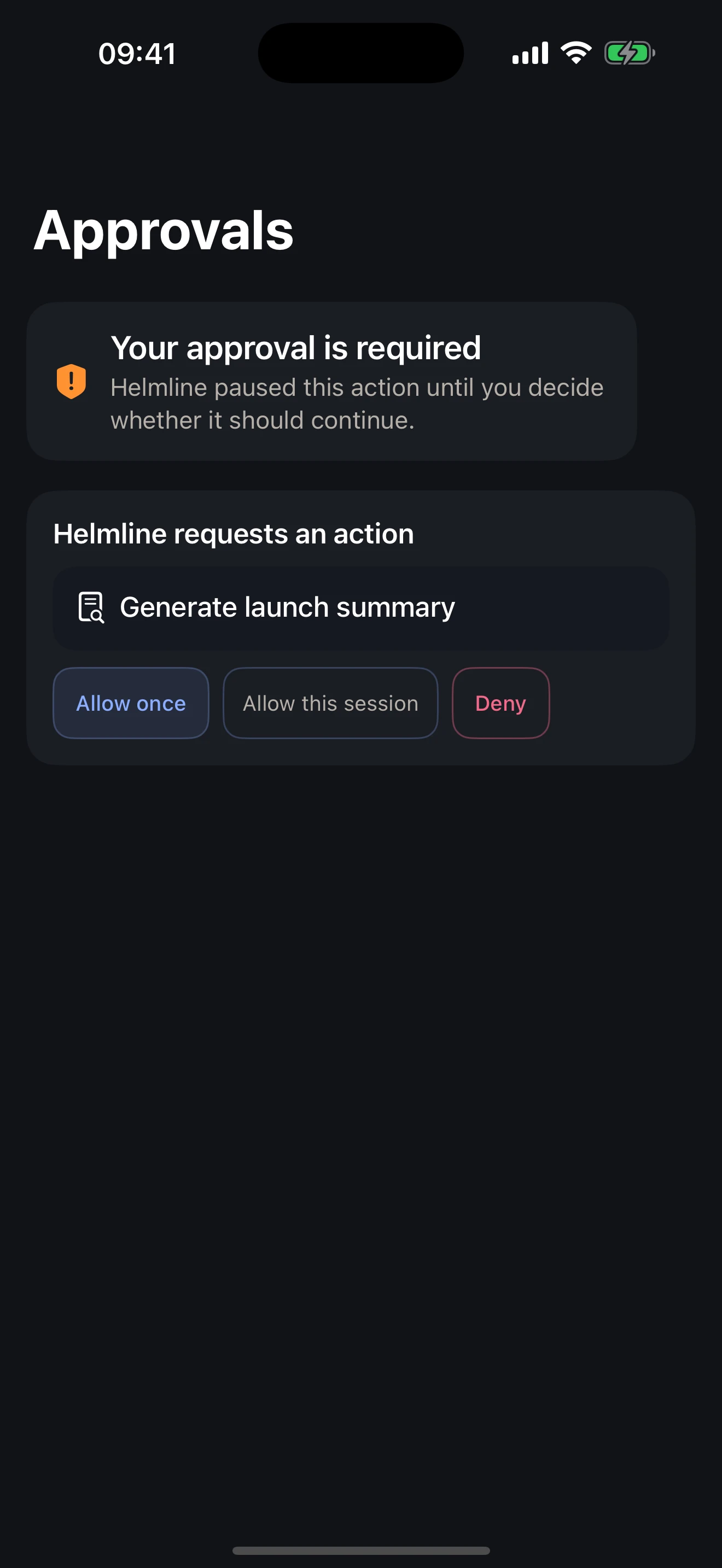
Approval UX: distinguish permission from confirmation
A mobile approval can authorize work on a much more capable host. I made the decision scope explicit: allow this request once, allow within the session, or deny. Those choices are different commitments, not interchangeable ways to dismiss a prompt.
Positive approval decisions pass through a shared device-authentication gate using Face ID or the device passcode. Denial does not require authentication. Dangerous session-level grants add a further confirmation before a broader permission is sent.
This introduces friction exactly where the user is granting authority. The same authorization boundary is used by chat and inbox approval paths, so an alternate entry point does not quietly weaken the decision.
The phone is a client, not a second agent runtime
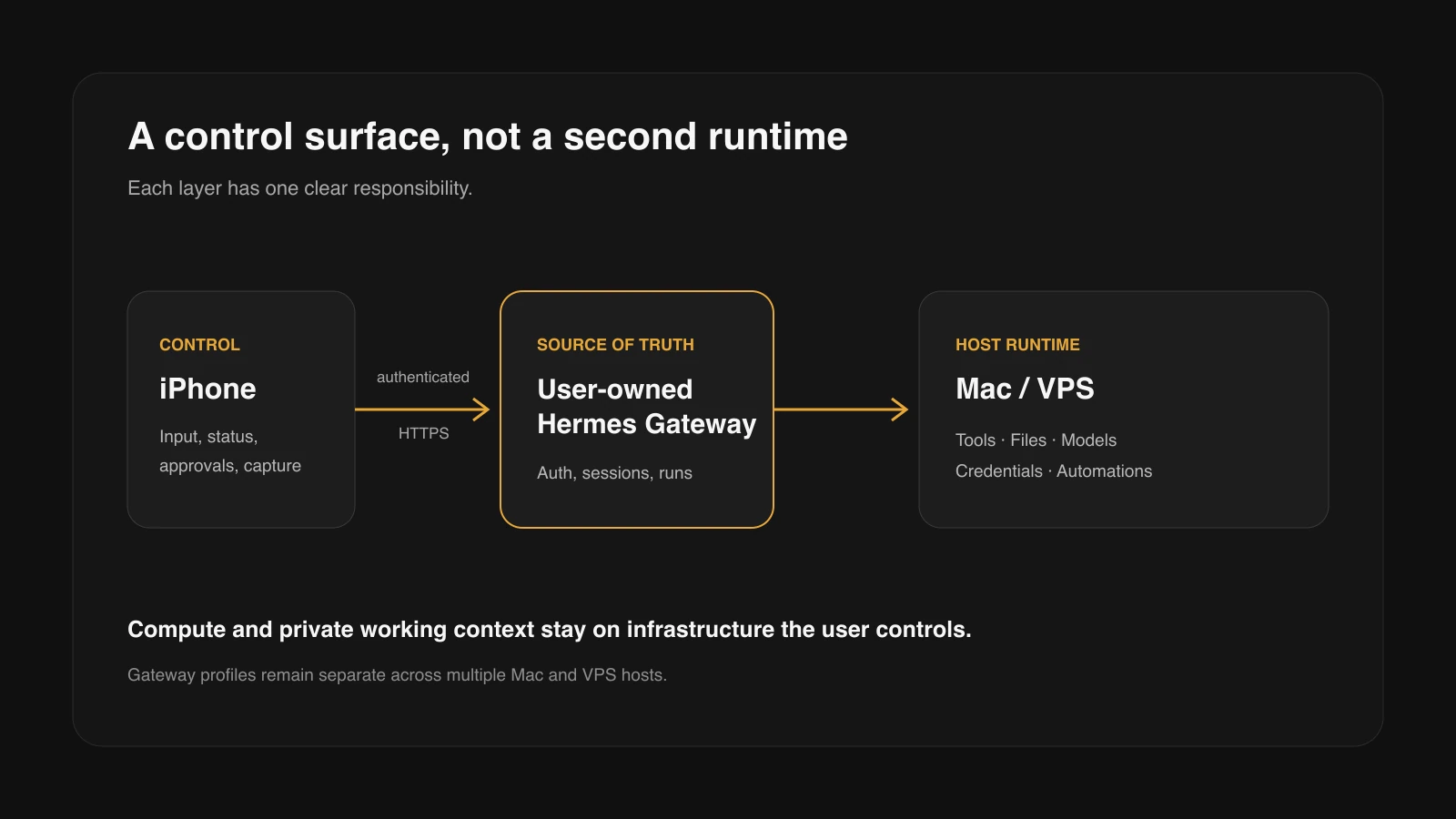
I chose a bring-your-own-Gateway model rather than building a hosted AI service. iPhone handles viewing, input, and control. Agent execution, desktop tools, and long-running tasks stay on the user-controlled host. This preserves a single authority for task state, but asks users to deploy and maintain their own compatible Gateway.
Engineering: carry host identity through every boundary
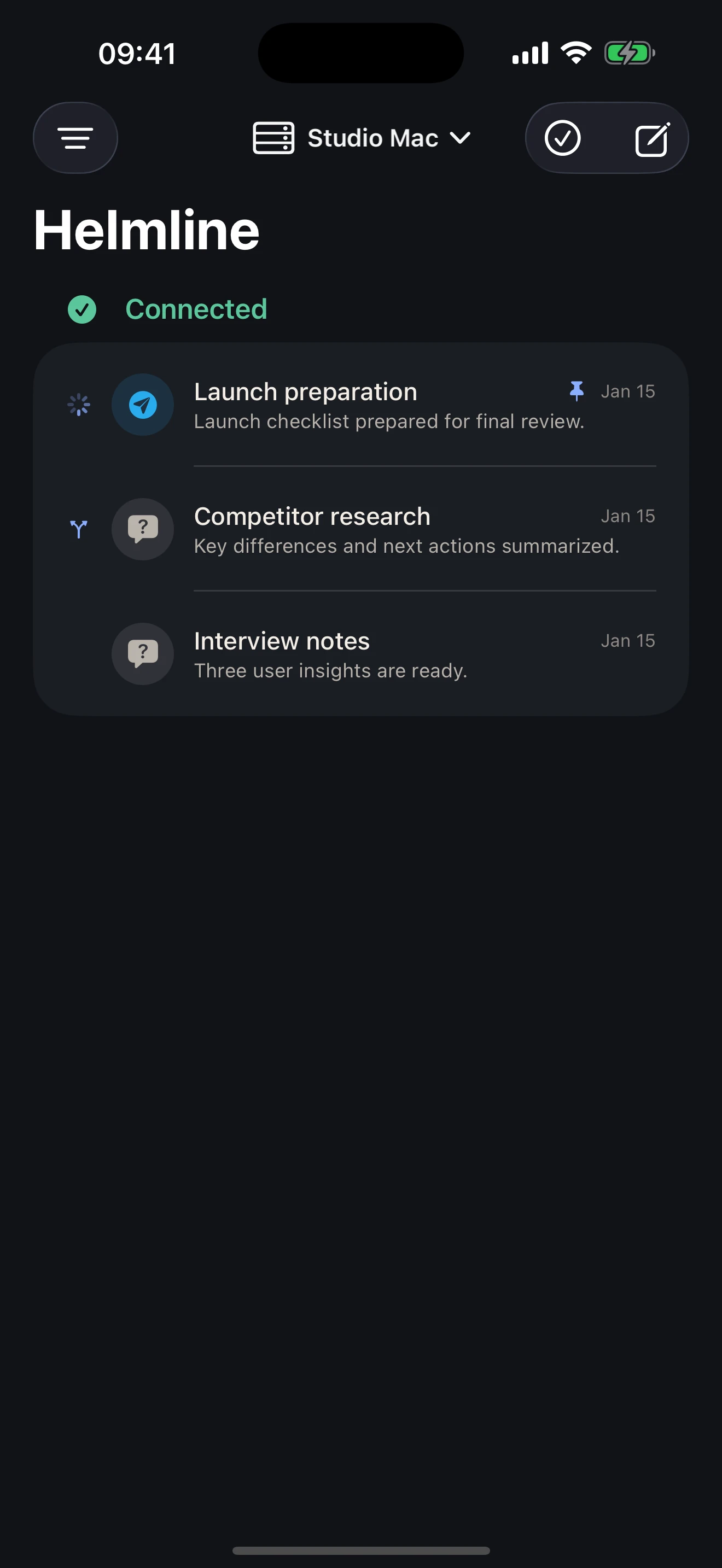
Supporting more than one Gateway is not just a server picker. A session, credential, active run, notification, or pending share must continue to refer to the host it belongs to after navigation or a connection switch.
Each Gateway profile has a stable identity. Credentials are stored under that identity in Keychain; run records and queries are scoped by instance and session. Switching the active instance invalidates transient client state instead of carrying the previous host’s view into the new connection.
The same boundary extends to shared content. Outbox items retain their target instance, and ambiguous replay across multiple profiles is refused. The design gives up a single blended view of every host in exchange for clearer ownership of the work being viewed or authorized.
Live streams provide immediate feedback, but a connection dropping is not a completion signal. The client must return to Gateway-owned state rather than treating a disconnected mobile view as the authority for a host-side task.
Native integration: capture now, route to the right host
Mobile input often starts outside the conversation. The Share Extension accepts text, links, images, and audio. Before a non-audio submission is sent, it is saved to an App Group outbox; audio enters a durable inbox for processing. Recording has a separate finalization path before it is handed off for upload or transcription.
That makes local capture and remote execution separate responsibilities. Saving a recording does not imply that transcription has completed, and retaining a share does not mean the agent has already received it. The selected Gateway remains responsible for transcription and agent work.
Widget and Live Activity carry run, session, and instance identity into system-level status and deep links. I treated these as lightweight awareness surfaces, while keeping consequential decisions inside authenticated app flows. Supporting those boundaries across app and extension processes was a larger part of the implementation than adding another screen.
From a personal workflow to a released product
I carried the work from defining the mobile role through native implementation and distribution. These are delivery stages, not a claim of a formal research program or dated experimental milestones.
- 01
Define the boundary
Keep the agent on the user’s host. Give iPhone responsibility for input, inspection, status, and deliberate control rather than recreating desktop execution.
- 02
Build the connected product
Implement sessions, execution detail, authenticated approvals, isolated Gateway profiles, capture, and native status within one consistent interaction model.
- 03
Validate and package
Take the app through physical-iPhone validation, app and extension signing, bilingual presentation, privacy documentation, and App Store submission.
- 04
Release publicly
Complete Apple review and manual publication of version 1.0. Make the public listing, requirements, and support/privacy information available alongside the case study.
Delivered: a public App Store release
I took the product through physical-iPhone validation, distribution signing, English and Simplified Chinese storefront preparation, Apple review, and manual release. Version 1.0 is now publicly available, delivered as build 1.0.0 (5). The public listing is the independently accessible evidence of release: apps.apple.com/app/id6787791371
This demonstrates end-to-end product delivery, not market traction. I am not claiming download growth, retention, revenue, or product-market fit. The screenshots illustrate the interface; they do not replace device validation.
- Public verification
- The live App Store listing identifies Helmline, its version, platform requirements, price, and published capabilities.
- Implementation evidence
- The frozen Build 5 source contains the native app, Share Extension, Widget and Live Activity integration, authentication boundary, and instance-scoped storage described here.
- Validation boundary
- Physical-device validation and Apple review are delivery evidence, not a usability study or proof of adoption. No market or performance metrics are inferred from them.
What users need to know
Helmline is free, with no Helmline account, advertising, or in-app purchases. It requires iOS 17 or later and a compatible Hermes Gateway that the user deploys and manages. Model and related service costs depend on the selected providers. Available operations depend on the connected Gateway’s capabilities.
It is not an out-of-the-box hosted AI service. Users remain responsible for host security, network access, and the data practices of their Gateway and providers. The App Store lists the developer’s privacy declaration as Data Not Collected; that does not mean content never leaves the phone.
Helmline is independently developed and compatible with open-source Hermes Agent. It is not an official Nous Research product and is not endorsed by Nous Research.
Design archive: the interfaces behind the product
The following boards and individual screens preserve the development-stage interface, then named Hermes iOS Companion. They use simulated demonstration data and show the design work behind Helmline, not the current App Store appearance or additional released capabilities.
The current release is shown above. This archive retains original labels where they explain an earlier design; simulator status and approval fixtures are not evidence of real push delivery or successful authentication.
Design boards: product flow, authorization, system surfaces, architecture
1 · Product flow. The board places navigation, pending work, host selection, and sharing together. These are connected entry points into the same host-owned work, rather than separate mobile features.
2 · Authorization and execution. The request, authentication boundary, and trace are shown side by side. The design question was how to let someone inspect an action before granting authority. The authentication panel is a development fixture, not a customer-facing diagnostic screen.
3 · Native system surfaces. Widget, Live Activity, sharing, and text selection explore how the app fits into iOS outside the conversation. These are simulator fixtures, not proof of background delivery on a physical device.
4 · Architecture. The earlier diagram makes the phone-to-host boundary visible, including a private-network transport used during development. It is a historical implementation view, not a requirement that every Helmline user use that exact network setup.
Interface archive: inspect the original screens
These original-resolution screens let the details remain readable outside the composite boards. They are development-stage captures with demonstration content, not screenshots of version 1.0.
1 · Conversation: how the answer and execution activity share the reading surface. 2 · Inbox: a separate place to return to pending work without searching the conversation.
3 · Execution trace: the inspection layer behind the summary. 4 · Approval: the requested action and permission scope at the point of decision. The released execution and approval views earlier in this case show the final presentation.

What this project taught me
A mobile agent interface needs more than conversation UI. It needs clear answers to what is happening, which host owns the work, and when the user must make a deliberate decision. Shipping Helmline meant carrying those boundaries through the interaction design, native implementation, and release process.
Explore more work
E-Tongue Sensory Decision Support Platform
A decision-support platform that combines E-Tongue taste measurements with semi-trained panel feedback, helping food developers compare prototypes and decide whether to Go, Tweak, or Stop.
View case studyPorsche Digital Interface
UX/UI internship work for Porsche Communication Management, with a focus on navigation flows, voice interaction, and safer multimodal control in the Taycan cockpit.
View case study